

WP Mail SMTP Review: Summary
This WP Mail SMTP Review delves into the leading SMTP plugin for WordPress, renowned for its reliability and security in email delivery. With over 3 million installations, it stands as the top choice for WordPress users. We explore its comprehensive features that simplify email management and provide a step-by-step guide on installing and configuring WP Mail SMTP on your WordPress site, ensuring efficient and secure email communication.
Ratings

WP Mail SMTP Review: What is WP Mail SMTP?
Full Disclosure: We were not paid for this WP Mail SMTP review and we are not an affiliate of this product, but want to provide an honest review. We have clients that use the free and paid version and we found the free version useful on many of our sites. Our WP Mail SMTP review reveals it as an essential WordPress plugin, transforming email delivery via SMTP (Secure Mail Transfer Protocol) - a robust and secure alternative to the default PHP mail() function. The necessity of WP Mail SMTP becomes evident considering many web hosts limit the PHP mail() function, resulting in critical emails like password resets or contact form alerts often going undelivered.
WP Mail SMTP assures enhanced reliability and security in email delivery for WordPress sites. By employing a secure SMTP server for sending emails, it mandates authentication, greatly reducing email abuse and improving deliverability. The plugin's compatibility with a variety of email service providers, such as Brevo (FKA Sendinblue), SendLayer, Gmail, Mailgun, SendGrid, and Zoho Mail, underscores its flexibility in email management.
Key features highlighted in this WP Mail SMTP review include site-wide and WooCommerce email tracking, comprehensive email logs, and support for multisite environments. WP Mail SMTP stands as a definitive solution for WordPress email challenges, ensuring reliable and efficient email communication for WordPress users.
WP Mail SMTP Review: How to Install
Step 1: Install WP Mail SMTP
To install WP Mail SMTP, navigate to Plugins > Add New in your WordPress dashboard. Search for "WP Mail SMTP" and click on the "Install Now" button. Once it has been installed, click on "Activate" to activate the plugin.
Step 2: Configure WP Mail SMTP Settings
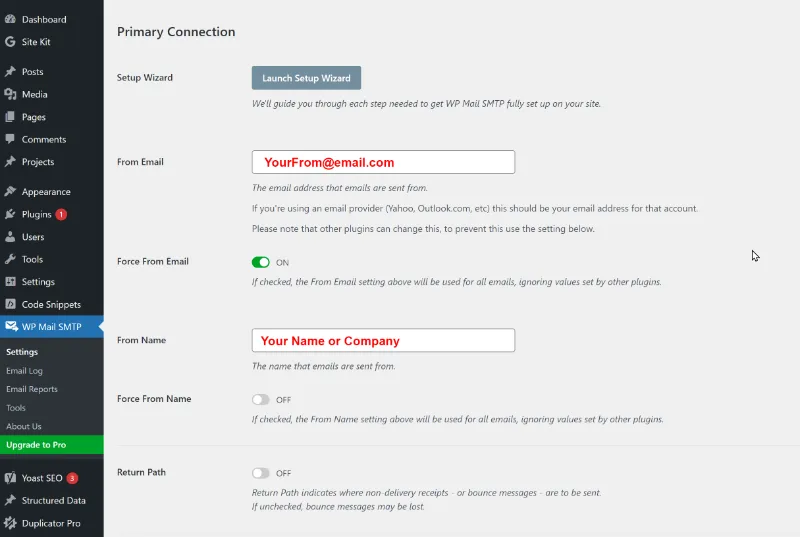
- To configure WP Mail SMTP settings, navigate to WP Mail SMTP in the left-hand menu. You'll be taken to the WP Mail SMTP settings page, where you can enter your SMTP credentials.
- First, enter the email address that will be used to send all WordPress emails in the "From Email" field. Then, enter the name that will be used to send emails in the "From Name" field. We recommend using your website's title as the from name.
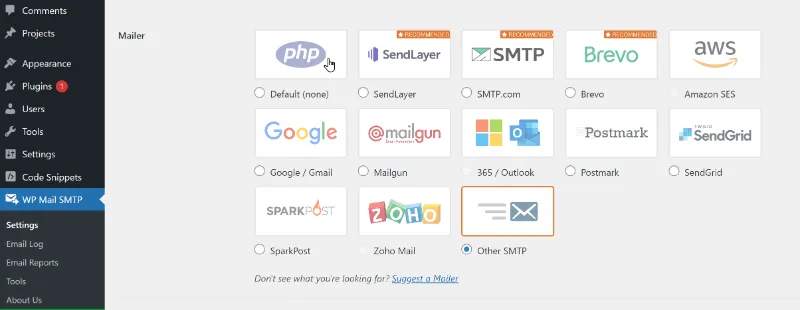
- Next, select "Other SMTP" from the "Mailer" drop-down menu. This is because you'll be sending emails using your host's SMTP server. Check the "Return Path" box if you want to receive delivery notifications or bounced messages.
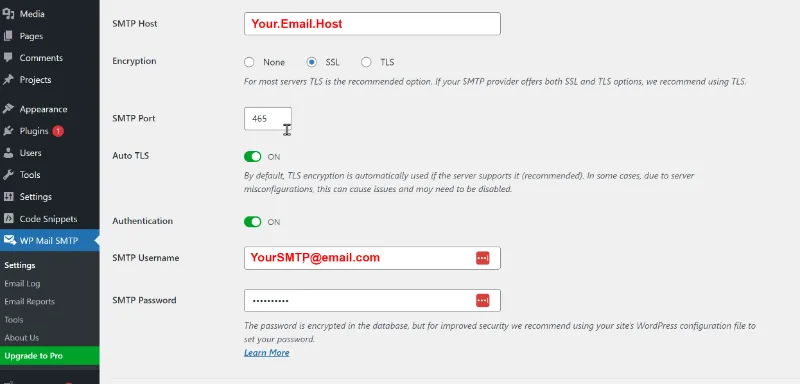
- Now it's time to enter your SMTP credentials. First, enter the SMTP host address provided by your hosting company in the "SMTP Host" field. Then, select the encryption method used by your mail server to send emails from the "Encryption" drop-down menu. Usually, it is TLS.
- Enter the port used by the outgoing mail server in the "SMTP Port" field. Set the "Auto TLS" setting to On and the "Authentication" setting to On. Enter the email address you are using to send emails in the "SMTP Username" field and the password for the email account in the "SMTP Password" field. We don't recommend saving SMTP passwords here. Instead, you need to store your password in the wp-config.php file.
"Note: Your setup info may differ from our WP Mail SMTP Review."
Step 3: Test the Connection
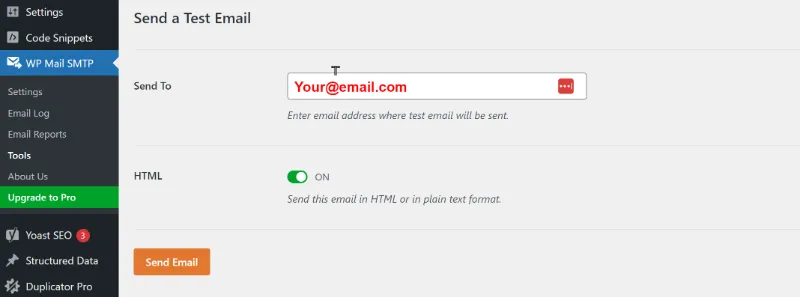
Once you have entered your SMTP credentials, click on the "Save Settings" button to save your changes. Then, click on the "Email Test" tab and enter an email address to send a test email. If everything is working correctly, you should receive the test email in your inbox.
This marks the end of the installation guide in our 'WP Mail SMTP Review.' The upcoming sections of our article explore the Pro version's features, address frequently asked questions, and weigh the pros and cons in greater detail. These segments in our WP Mail SMTP review are designed to provide you with a thorough understanding of WP Mail SMTP, ensuring you can make an informed decision about upgrading and optimizing your email solutions on WordPress.
WP Mail SMTP Pro Features
In our WP Mail SMTP Review we used mainly the free version, but the WP Mail SMTP Pro is the premium version of the plugin, which offers more advanced features and capabilities than the free version. In most cases you need the pro version to connect Microsoft or other transactional email API's, Some of the features include:
- Email logs: The pro version allows you to easily resend or forward any email to one or more email addresses directly from within the WordPress dashboard.
- Advanced tracking capabilities: The plugin's advanced tracking capabilities let you monitor email performance by tracking metrics such as opens and clicks. This is especially useful for WooCommerce users who want to keep track of their e-commerce-specific emails.
- Multisite support: This feature allows users to manage email logs and track emails across all sub-sites without having to navigate to each individual site. For those who manage multiple sites, this feature can save a significant amount of time and effort.
- Alerts: The pro version also offers alerts to notify you if there are any issues with email delivery.
- Additional connections: The pro version allows you to set up multiple SMTP connections, which is useful if you need to send emails from different email accounts.
- Smart routing: This feature lets you automatically route emails to the best email service provider based on the recipient's email address.
In our 'WP Mail SMTP Review', we highlight that WP Mail SMTP Pro is an outstanding option for users managing multiple WordPress sites, particularly in a multisite environment. It ensures seamless integration and robust support across all sub-sites, simplifying the email management process. Furthermore, WP Mail SMTP Pro presents a diverse selection of email service providers, empowering users to choose the one that aligns best with their specific requirements, enhancing overall email communication efficiency
WP Mail SMTP Review: Pros and Cons
Pros:
In our "WP Mail SMTP Review," we highlight the numerous advantages that make WP Mail SMTP a preferred choice for WordPress users. Here are the expanded pros of using this plugin:
- User-Friendly Setup Wizard: WP Mail SMTP comes with an intuitive setup wizard, making it easy for even non-technical users to configure their email settings efficiently, ensuring a smooth and straightforward setup process.
- Support for Diverse Email Service Providers: This plugin boasts compatibility with a vast array of email service providers, including but not limited to Sendinblue, SendLayer, Gmail, Mailgun, SendGrid, and Zoho Mail. This flexibility allows users to choose the provider that best fits their specific needs and preferences.
- Comprehensive Email Tracking: WP Mail SMTP offers detailed email tracking capabilities. This includes not only site-wide email tracking but also specialized tracking for WooCommerce-specific emails, which is invaluable for e-commerce sites in monitoring and optimizing their email communications.
- Robust Multisite Support: For users managing multiple WordPress sites, WP Mail SMTP's multisite support is a significant advantage. It allows seamless management of email settings across various sites from a single interface, enhancing efficiency and control.
- Advanced Features in Premium Version: The premium version of WP Mail SMTP unlocks even more powerful features. This includes in-depth email logs that provide valuable insights into your email performance and alerts that notify you of any issues in real-time, ensuring you are always aware of and in control of your email communication.
- Reliable Email Delivery: WP Mail SMTP significantly improves email deliverability. By using SMTP, it ensures that emails are not only sent but also reach their intended recipients reliably, reducing the chances of emails being lost or marked as spam.
- Enhanced Security: With SMTP authentication and the option for SSL/TLS encryption, WP Mail SMTP enhances the security of your email communications, ensuring sensitive information is protected.
- Customizable Settings: The plugin offers customizable settings to tailor the email sending process according to specific requirements, including the ability to specify From Names, From Email addresses, and choose HTML or Plain Text email formats.
In this "WP Mail SMTP Review," these pros underscore the plugin's capability to enhance email reliability, security, and management in WordPress, making it a top choice for users looking to optimize their email communication strategies.
Cons:
In our "WP Mail SMTP Review," it's also important to consider some of the potential drawbacks or limitations of the WP Mail SMTP plugin. Here's an expanded list of cons:
- Complexity for Beginners: Despite its easy setup wizard, beginners or non-tech-savvy users may still find configuring SMTP settings a bit complex, especially when dealing with SMTP hosts and ports.
- Limited Features in Free Version: The free version of WP Mail SMTP, while robust, has limitations in terms of advanced features. Essential functionalities like email logs, advanced email tracking, and real-time alerts are reserved for the premium version.
- Dependency on External SMTP Service: WP Mail SMTP requires an external SMTP service for sending emails, which means users need to rely on and manage an additional service outside of WordPress.
- Possible Deliverability Issues with Certain Hosts: Some hosting providers have strict email sending policies, which might interfere with or limit the plugin's effectiveness, potentially leading to deliverability issues.
- Cost of Premium Version: While the free version is quite functional, accessing the full suite of features requires purchasing the premium version, which might be a consideration for budget-conscious users or small businesses.
- Maintenance and Updates: Regular maintenance and updates are required to keep the plugin functioning properly, which might be a hassle for some users, especially if it conflicts with other plugins or themes.
- Potential Compatibility Issues: While generally compatible with most setups, there might be instances of compatibility issues with certain WordPress themes or plugins, requiring troubleshooting.
- Email Sending Limits: Depending on the SMTP service used, there might be limitations on the number of emails that can be sent, which could be a constraint for sites with high email traffic.
In this "WP Mail SMTP Review," acknowledging these cons helps provide a balanced understanding of the plugin. While WP Mail SMTP offers numerous benefits, these potential challenges should be considered when deciding if it's the right tool for your WordPress email needs.
WP Mail SMTP Review: FAQ
Q: Do I need to use WP Mail SMTP with my WordPress site?
A: No, you don't need to use WP Mail SMTP with your WordPress site. However, if you're experiencing issues with email delivery or want to track your emails' performance, WP Mail SMTP is an excellent solution.
Q: Is WP Mail SMTP free?
A: Yes, WP Mail SMTP is free to use. However, some advanced features are only available in the pro version.
Q: Can I use WP Mail SMTP with any email service provider?
A: Yes, WP Mail SMTP supports a wide range of email service providers, including Sendinblue, SendLayer, Gmail, Mailgun, SendGrid, and Zoho Mail, among others.
Q: How do I troubleshoot WP Mail SMTP if I'm experiencing issues?
A: If you're experiencing issues with WP Mail SMTP, you can try checking your SMTP credentials, checking your email provider's settings, and checking your email logs to see if there are any error messages. You can also contact WP Mail SMTP support for assistance.
Q: Can I set up multiple email addresses with WP Mail SMTP? A: Yes, WP Mail SMTP allows you to configure multiple email addresses for sending emails, depending on your email service provider and the plan you are using.
Q: Is WP Mail SMTP compatible with all WordPress themes and plugins? A: WP Mail SMTP is generally compatible with most WordPress themes and plugins. However, it's always a good practice to test any new plugin with your specific theme and plugin combination.
Q: How secure is WP Mail SMTP for sending sensitive information? A: WP Mail SMTP uses SMTP, which is a more secure method for sending emails compared to PHP mail(). It requires authentication and can be configured with encryption (like SSL/TLS), making it safer for sending sensitive information.
WP Mail SMTP Review: Alternatives
In this "WP Mail SMTP Review," we also consider alternative SMTP plugins for WordPress users seeking different features or experiences. While WP Mail SMTP is a top choice for many, the following alternatives offer varied functionalities:
- Easy WP SMTP: This plugin is a lightweight SMTP plugin that is easy to use and has basic features.
- Post SMTP Mailer/Email Log: This plugin offers SMTP support and email logging, as well as other advanced features like SSL/TLS encryption and email throttling.
- SMTP by WPForms: This SMTP plugin is made by the same team as WP Mail SMTP and offers many of the same features, including email logs and support for a wide range of email service providers.
- SendGrid: Not just a plugin but a complete email delivery service, SendGrid offers an SMTP plugin for WordPress. It's known for its scalability, making it suitable for both small and large businesses.
- Mailgun SMTP: This plugin integrates with the Mailgun service, offering reliable SMTP solutions along with detailed analytics and reporting features, ideal for those who need in-depth email tracking.
- WP Offload SES Lite: A plugin specifically designed for Amazon SES users, it's an excellent choice if you're already using or planning to use Amazon's email service. It offers reliable delivery and is capable of handling large volumes of email.
- G Suite/Gmail SMTP: For users heavily invested in the Google ecosystem, using a Gmail-based SMTP plugin can provide seamless integration and reliability, leveraging Google's robust email infrastructure.
- Fluent SMTP: This newer plugin is quickly gaining popularity due to its user-friendly interface and support for multiple mailers, making it a versatile option for various needs.
In this "WP Mail SMTP Review," these alternatives are highlighted for users who might be exploring different options. Each plugin offers unique strengths, catering to various requirements in terms of email volume, security, and integration capabilities. Depending on your WordPress site's specific needs, one of these alternatives may be a more suitable SMTP solution.
WP Mail SMTP Review: Conclusion
In this WP Mail SMTP Review, we conclude that WP Mail SMTP stands out as a vital plugin for WordPress users seeking reliable and secure email delivery. Its user-friendly setup wizard, coupled with compatibility across numerous email service providers, streamlines the configuration process. WP Mail SMTP is not just easy to set up but also a robust tool for email tracking and management.
While some users might face initial setup challenges (hopefully our WP Mail SMTP review helps with that), the advantages of WP Mail SMTP significantly overshadow these minor hurdles. It's an invaluable asset for any WordPress site, from small blogs to extensive e-commerce platforms, ensuring that emails are delivered both reliably and efficiently. For those requiring more advanced functionalities, such as email logs and multisite support, the pro version of WP Mail SMTP offers an excellent enhancement.
Therefore, for anyone grappling with email delivery issues on their WordPress site, WP Mail SMTP is a solution worth considering. With its combination of powerful features and straightforward setup, it empowers users to handle secure and dependable email communications effortlessly. That concludes our WP Mail SMTP Review, thanks for reading if you got this far.
WP Mail SMTP Review last updated on: 11/14/23
